Custom Rules
Custom rules allow you to define conditions to evaluate users and assign them to specific variations. When the rule conditions are satisfied, the user will receive the variation you defined. You can also use rollout percentage distribution within a rule to split users between multiple variations.
Rule Types
Bucketeer supports four types of custom rule conditions. You can combine multiple condition types in a single rule to create sophisticated targeting strategies.
User Attributes
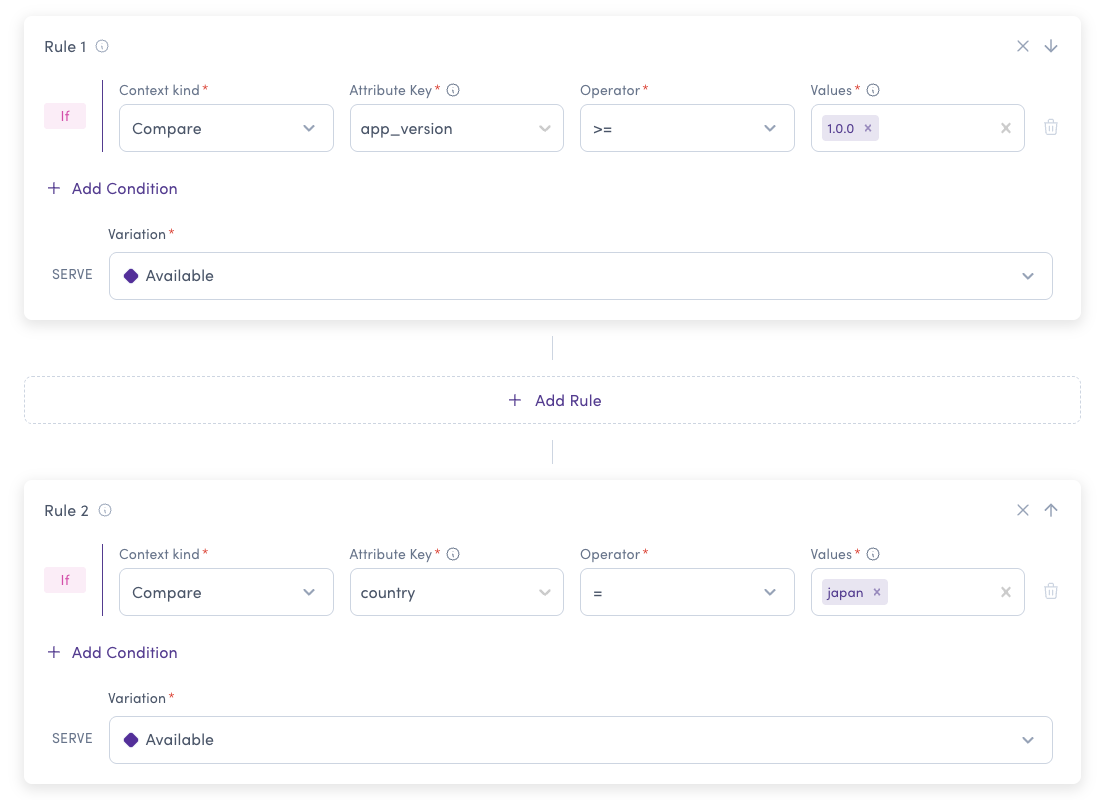
Target users based on their characteristics like app version, device type, language, or any custom attributes you define. This is one of the most flexible targeting options in Bucketeer.
How it works:
The user attributes refer to the end-user attributes you define when initializing the SDK on the client side. If you use dynamic attributes, use the updateUserAttributes function.
Example SDK configuration (JavaScript):
const attributes = {
  app_version: '1.0.0',
  os_version: '11.0.0',
  device_model: 'pixel-5',
  language: 'english',
  plan: 'premium'
};

const user = defineBKTUser({
  id: 'USER_ID',
  attributes: attributes,
});

await initializeBKTClient(config, user);
Common use cases:
- Progressive rollout by app version
- Platform-specific features (iOS vs Android)
- Localization testing
- Device-specific optimization
- User tier targeting (free vs premium)
User Segments
Target predefined groups of users by their IDs or by attribute-based rules. Create reusable segments like "Beta Testers", "VIP Users", or "Internal Team" and apply them across multiple flags.
How it works: User segments allow you to create user groups based on the unique ID of end users, on attribute-based segment rules, or both. A user belongs to the segment if their ID is in the uploaded user list or if they match any of the segment rules. Once you've created a segment, you can use it in your targeting rules to assign variations to all users in that segment.
Learn more about creating and managing segments on the Segments page.
Common use cases:
- Beta testing with selected user groups
- VIP features for premium customers
- Internal testing with employee segments
- Regional rollouts
- Customer cohorts (e.g., "High-value customers", "Trial users")

Benefits of segments:
- Manage user groups centrally - update once, affects all flags
- Reuse across multiple flags
- Easier maintenance than individual targeting
- Bulk operations with CSV uploads
- Rule-based membership - target users by attributes without maintaining ID lists (see Segment rules)
Date-Based Conditions
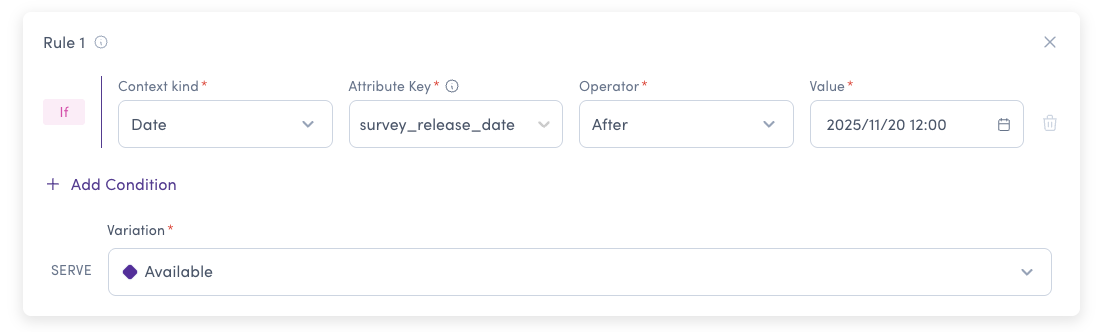
Target users based on time-related conditions using timestamp attributes. Compare dates with "before" or "after" operators.
How it works: Date conditions use attributes with timestamp format. Bucketeer compares the user's date attribute with your specified date to determine the variation.
Common use cases:
- Grandfathering users - Preserve legacy pricing for existing customers
- Time-limited access based on trial or subscription dates
- Progressive rollout by cohort (older accounts first)
- Sunset old features for new users only
- Anniversary promotions for long-term users
Ensure your SDK sends date attributes in a timestamp format that Bucketeer can parse correctly. Common formats include Unix timestamps or ISO 8601 date strings.
Be aware of time zone differences when setting comparison dates. Bucketeer evaluates dates in UTC unless specified otherwise in your SDK configuration.
Feature Flag Dependencies
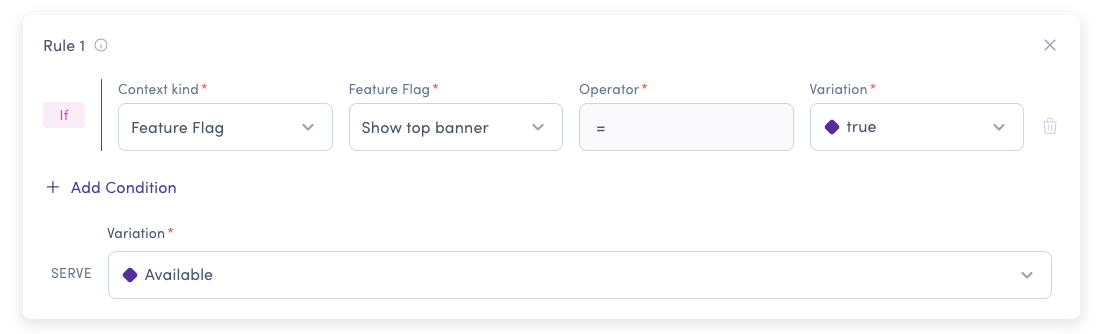
Create targeting rules based on the evaluation results of other feature flags. This enables you to build complex flag relationships and control feature rollouts based on other features.
How it works: The rule's condition is satisfied if the user is evaluated with the expected variation on the specified feature flag. Unlike prerequisites (which fail immediately), feature flag rules in custom rules allow evaluation to continue to the next rule if not matched.
Common use cases:
- Progressive feature rollout - Enable advanced features only when basic features are enabled
- Feature bundling - Group related features together
- Gradual migration - Control multiple flags based on a master flag
- A/B test variations - Different flag behavior based on experiment assignment
- Safety controls - Disable dependent features when parent feature is off
- Prerequisites (evaluated at step 2) return OFF variation if they fail
- Feature flag rules (evaluated at step 4) continue to the next rule if they don't match
- Use prerequisites for hard dependencies, feature flag rules for conditional logic
Supported Operators
Bucketeer supports a wide range of operators for creating custom rules. Choose the appropriate operator based on your targeting needs:
| Operator | Symbol | Description | Use Case Example |
|---|---|---|---|
| Equals | = | Exact match | plan = "premium" |
| Not Equals | ≠ | Does not match | status ≠ "banned" |
| Greater Or Equal | >= | Greater than or equal to | age >= 18 |
| Greater | > | Greater than | credits > 100 |
| Less Or Equal | <= | Less than or equal to | score <= 50 |
| Less | < | Less than | attempts < 3 |
| Contains | IN | Value is in a list | region in ["US", "CA", "UK"] |
| Partially Matches | - | Contains substring | email partially matches "@company.com" |
| Starts With | - | Begins with prefix | user_id starts with "test_" |
| Ends With | - | Ends with suffix | domain ends with ".edu" |
| Before | - | Date/time is before | account_created before 2024-01-01 |
| After | - | Date/time is after | trial_end after today |
Creating Custom Rules
To create a custom rule:
- Click + Add Rule and select Custom Rule
- Select the Context kind:
- Compare - User attributes
- Segment - User segments
- Date - Time-based conditions
- Feature flag - Flag dependencies
- Configure the condition based on your selected type
- Choose the variation to return when the condition matches
- Optionally, use rollout percentage to split traffic
Combining Conditions
You can combine multiple condition types in your custom rules to create sophisticated targeting strategies. Within a rule, multiple conditions use AND logic - all conditions must be satisfied.
Example: Show premium_dashboard only if:
subscription = "premium"(User attribute)- AND user is in
Beta Testerssegment (User segment) - AND
account_created before 2024-01-01(Date condition)
Example: Multi-Condition Rule
Suppose you want to target users with specific attributes and apply percentage distribution:
- For users with
app_version = 1.0.0ANDlanguage = english: provide the value-1 variation - For users with
app_version = 2.0.0: deliver variations using percentage distribution:- 10% receive value-1
- 20% receive value-2
- 30% receive value-3
- 40% receive value-4
When using rollout percentage based on percentage distribution, the sum should always be equal to 100%.
Best Practices
Custom rules are evaluated in the order they appear. Place more specific rules before general ones. The first matching rule wins and returns its variation. You can change the order by moving rules up or down in the UI, and the updated sequence is persisted via the rule_order field.
- Strings: Use equals, contains, starts with, ends with operators
- Numbers: Use comparison operators (
>,<,>=,<=,=) - Dates: Use before/after operators with timestamp format
- Lists: Use the "contains" (IN) operator to match against multiple values
- Limit the number of conditions in a single rule to maintain fast evaluation
- Use segments for large user groups instead of individual targeting
- Avoid deep feature flag dependency chains (keep to 2-3 levels)
Bucketeer supports semantic versioning (SemVer) for attributes like app_version. You can use SemVer in the targeting rules to control feature rollout based on application versions.
- Node.js SDK: Supports both formats (
1.2.3andv1.2.3) and can compare between them. - Go SDK: Requires consistent format - both values must use the same format (either both with
vprefix or both without).
For reliable results, we recommend using the same version format consistently across your application.